Open your website right now. It loads instantly. Images appear, text renders cleanly, everything feels snappy. You've probably even run it through PageSpeed Insights and felt pretty good about the score.
So performance can't be your problem — right? Wrong. What you're experiencing is a warm cached load. Your browser already knows your site. AI crawlers never do.
What a Cached Page Actually Is
Every time you visit a website, your browser saves pieces of it — images, fonts, scripts, stylesheets — in local memory on your device. The next time you visit, it loads those saved assets from your own machine instead of downloading them again. Pages feel fast because most of the work was already done on a previous visit.
This is why your site feels fast to you. You've been there before. A first-time visitor — or an AI crawler — gets something very different.
What a Cold Load Actually Is
A cold load is what happens when a browser or crawler visits your site with zero prior history. No cached images. No stored scripts. No saved fonts. Everything has to be downloaded fresh from your server in real time.
This is the experience of every new customer who clicks a link to your site for the first time. It's also the experience of GPTBot, PerplexityBot, Googlebot, and every other crawler that influences AI recommendations — every single visit, without exception.
There is no cache. There is no stored relationship. Every crawl is day one. If your site takes 11 seconds to fully load on a cold visit, that is what the crawler sees — every time it comes back.
The Two Numbers That Tell the Real Story
Google PageSpeed Insights shows two distinct data sets that most business owners completely misread. The first is field data — real user experiences collected over the past 28 days, including returning visitors with warm caches. This number often looks fine. Core Web Vitals frequently pass. Business owners see green checkmarks and conclude their site is performing well.
The second is lab data — a simulated cold load run by Lighthouse on a fresh session with no cache. This is where the truth lives. A site that passes Core Web Vitals with a warm field score can score 34 on a cold lab test with an LCP of over 10 seconds and a Total Blocking Time above 4,000 milliseconds — meaning the page loaded but was completely frozen for four full seconds before responding to anything.
We've audited sites that showed a "respectable" mobile score for the owner — but delivered a 14-plus second Largest Contentful Paint on a cold load. AI crawlers never got past the first few seconds. Field data tells you how loyal returning visitors experience your site. Lab data tells you how AI crawlers and new customers experience it. For AI visibility, only one of those numbers matters.
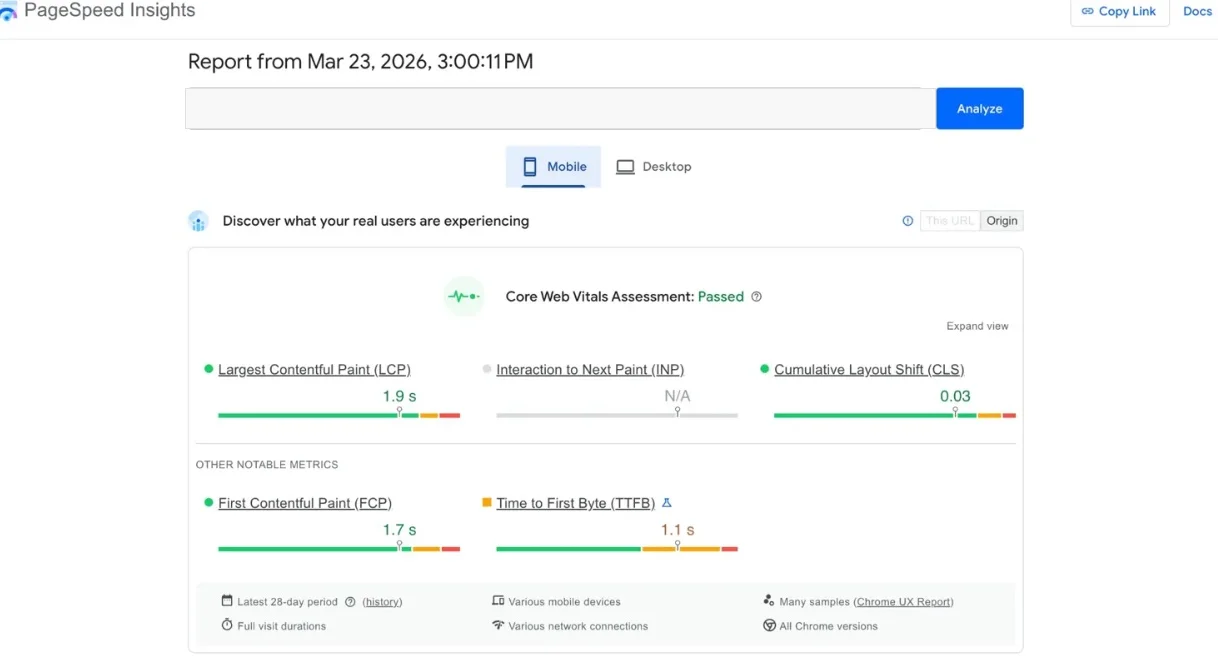
FIELD DATA — WHAT THE OWNER SEES
Core Web Vitals: Passed. Warm cache, returning visitors. Looks fine.
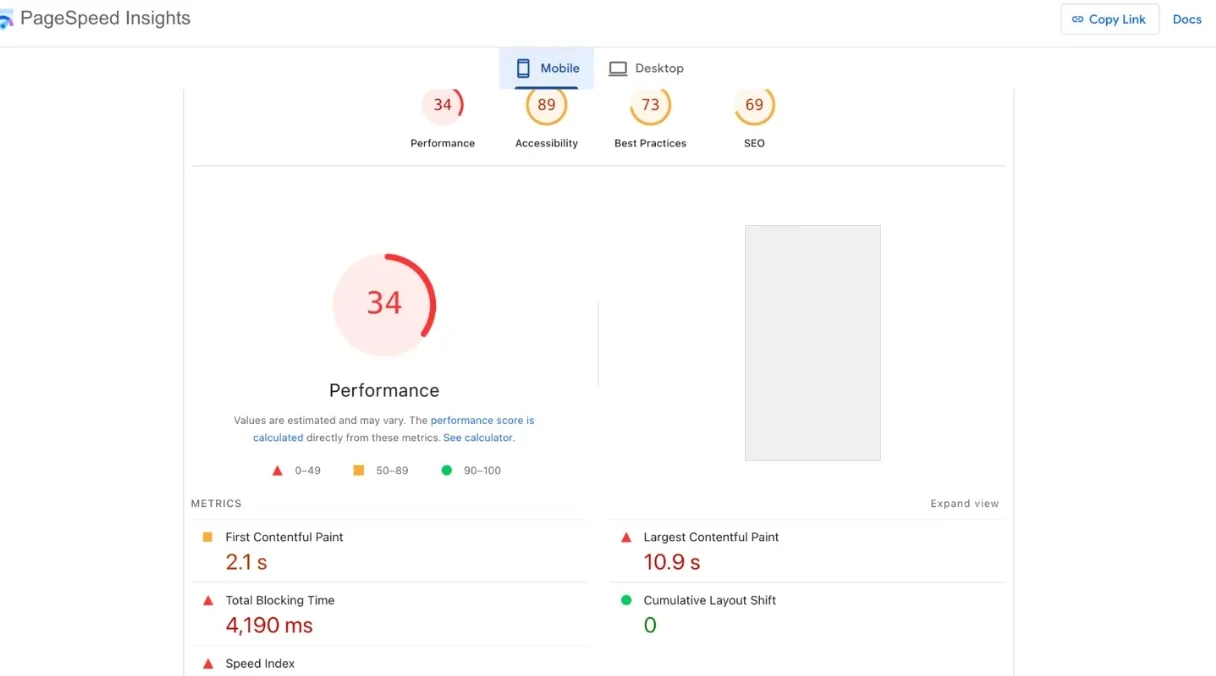
LAB DATA — WHAT AI CRAWLERS SEE
Performance: 34. LCP: 10.9s. Cold load. This is what GPTBot experiences.
WARM CACHE VS. COLD CRAWL
That 3 to 6 second difference on a cold load isn't just annoying — it's often the entire budget an AI crawler is willing to spend on your page before moving on to a faster competitor.
Why AI Crawlers Have No Patience for Slow Cold Loads
AI crawlers operate on a token budget — a finite amount of time and resources allocated per page. When a crawler lands cold and the page is slow, scripts are blocking the main thread, and content is still loading, the crawler doesn't wait.
It moves on. The schema block that identifies your business, the FAQ content that answers the question someone might ask an AI, the structured data in your page — none of it gets read if the crawler gives up before reaching it.
A fast cold load is the price of admission for AI indexing. Every second of unnecessary load time is a second the crawler could spend extracting your content — or deciding your competitor's page is worth more of its budget.
The Wearable Problem Makes This Even More Critical
As AI moves onto wearable devices — smartwatches, AI glasses, voice assistants — the cold load problem compounds. When someone asks a wearable "who's the best HVAC company near me," the device doesn't fetch your site in that moment. It answers from what the AI already knows — from previous crawls, from indexed structured data, from trust signals already on file.
By the time someone asks their device that question, the opportunity to influence the answer has already passed. Either your site performed well on a cold crawl weeks or months ago and got indexed with sufficient authority — or it didn't. The crawl already happened. The answer is already formed.
What Cold-Load-Ready Infrastructure Actually Looks Like
Building for cold load performance means optimizing for an audience that has never seen your site. It means serving pages from edge infrastructure that responds in milliseconds regardless of where the crawler originates. It means images compressed and sized before they reach the browser. It means JavaScript that doesn't block the main thread while your schema is still loading.
This is why every site we build at KodeCite.AI runs on Next.js deployed to Vercel's global edge network. When GPTBot visits from a data center in Virginia, it gets a consistent sub-150ms Time to First Byte from the nearest edge node — not a single origin server 1,500 miles away spinning up to handle the request. Schema and structured data arrive in the initial HTML response, server-rendered, readable immediately. No JavaScript render cycle required. No crawl budget wasted waiting for content to appear.
The Test You Should Run Right Now
Go to PageSpeed Insights and run your site. Scroll past the field data — past the green checkmarks — and look at the lab data. That performance score and that LCP number are what every AI crawler sees. If the lab score is below 70 on mobile, you are leaving AI citations on the table every crawl cycle. If it's below 50, no amount of content or schema will fully compensate — because the crawler isn't staying long enough to read any of it.
Your site feeling fast to you is irrelevant. The only performance that matters is the one AI sees on a cold start. If you've never measured that, you don't actually know where you stand.